Q => How to add “Comments" on ‘Microsoft Office Word Document’?
A => Under the “Review tab”, you have the option for adding/deleting options for the comments.
Tip => For better understanding on versions of comments, you can have the access of the following;
“Change Tracking Options” under ‘Track Changes’ and “Reviewing Pane”.
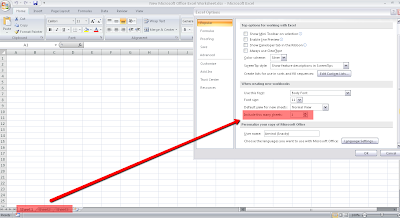
Step-1: Open Excel Sheet (2007)
Step-2: Click on “Office Button”
Step-3: Select ‘Excel Option’
Step-4: Under ‘Change the most popular options in Excel.’ >> ‘When creating new workbooks’; Edit the option ‘Include this many sheets’ as “1”.
-----
Resultant Step-5: [Pass Scenario]: When opening the new Excel sheet via “Windows Start”, the Sheets for the new excel will be ‘1’.
-
Resultant Step-5: [Failed Scenario]: When opening/creating the new Excel sheet via shortcut (right click) > New > ‘New Microsoft Excel Worksheet’, the Sheets for the new excel will be ‘3’ (default).


